How to use Setboard
Ten minutes from opening your library to a crate in Serato. You need Chrome or Edge and a Serato DJ library.
Prefer to watch first? Here is the whole flow in 74 seconds, sound on.
1. Open your library
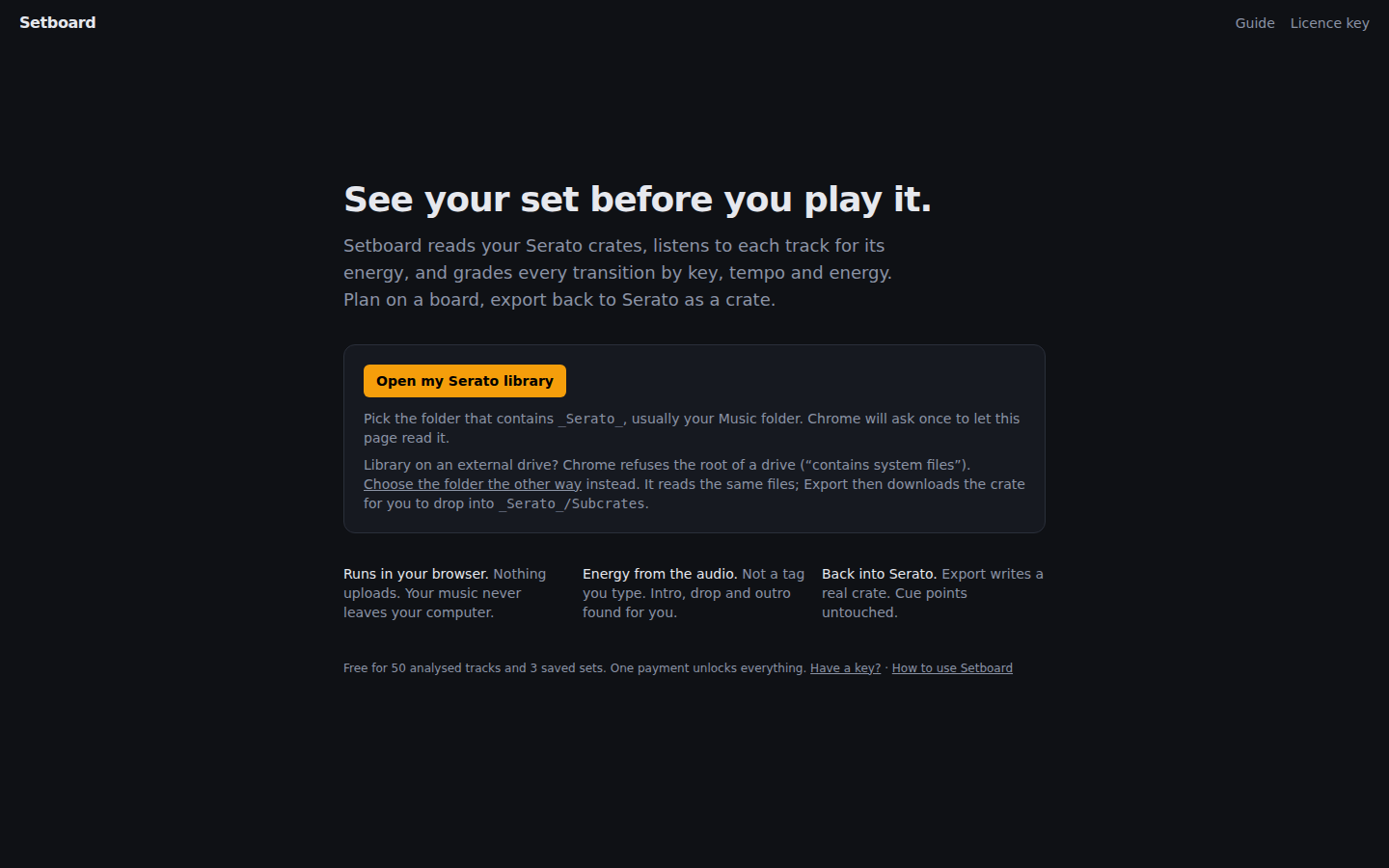
Go to the app and click Open my library. Pick the folder that contains _Serato_. On most computers that is your Music folder. Chrome asks once whether the page may read it; Setboard remembers the folder for next time.
Your crates appear in the dropdown on the left, with each track's BPM and key as Serato has them. Nothing is uploaded; the page reads the files directly from disk.
Using Rekordbox? In Rekordbox choose File → Export Collection in xml format and save rekordbox.xml into your Music folder (or the folder above your tracks). Then click Open my library and pick that folder. Your playlists appear like crates, folders included, with Rekordbox's BPM, key, hot cues, memory cues and loops. Export again after you add tracks in Rekordbox; Setboard reads the newest XML it finds.
2. Analyse a crate
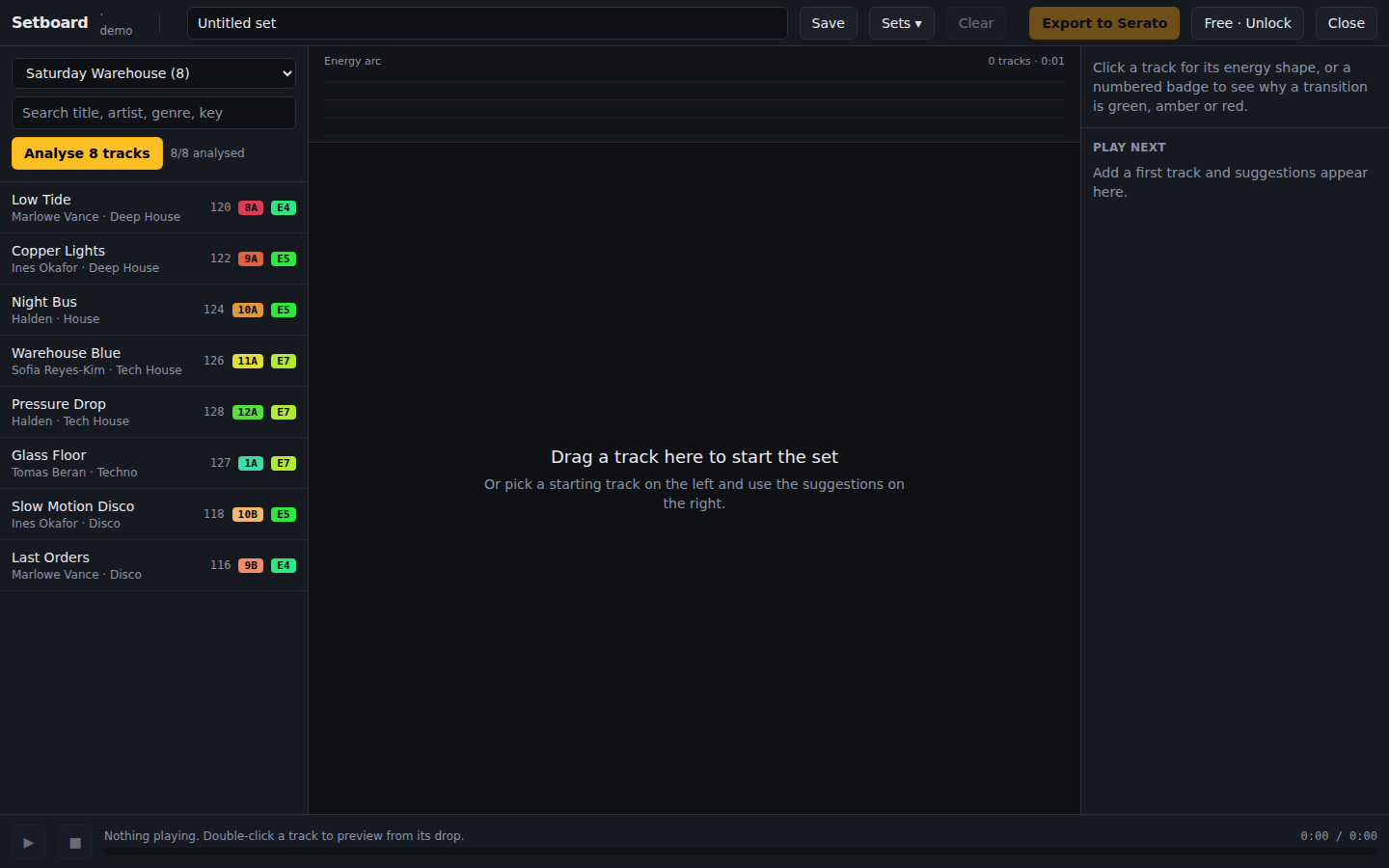
Choose a crate and press Analyse. Each track is decoded and measured on your computer: an energy score from 1 to 10, the length of its intro and outro, and where the first drop lands. If Serato has no key or BPM for a track, Setboard detects them.
Analysis runs one track at a time and takes a few seconds each. Results are cached, so a crate only takes time once. The free version analyses up to 50 tracks.
3. Build the set
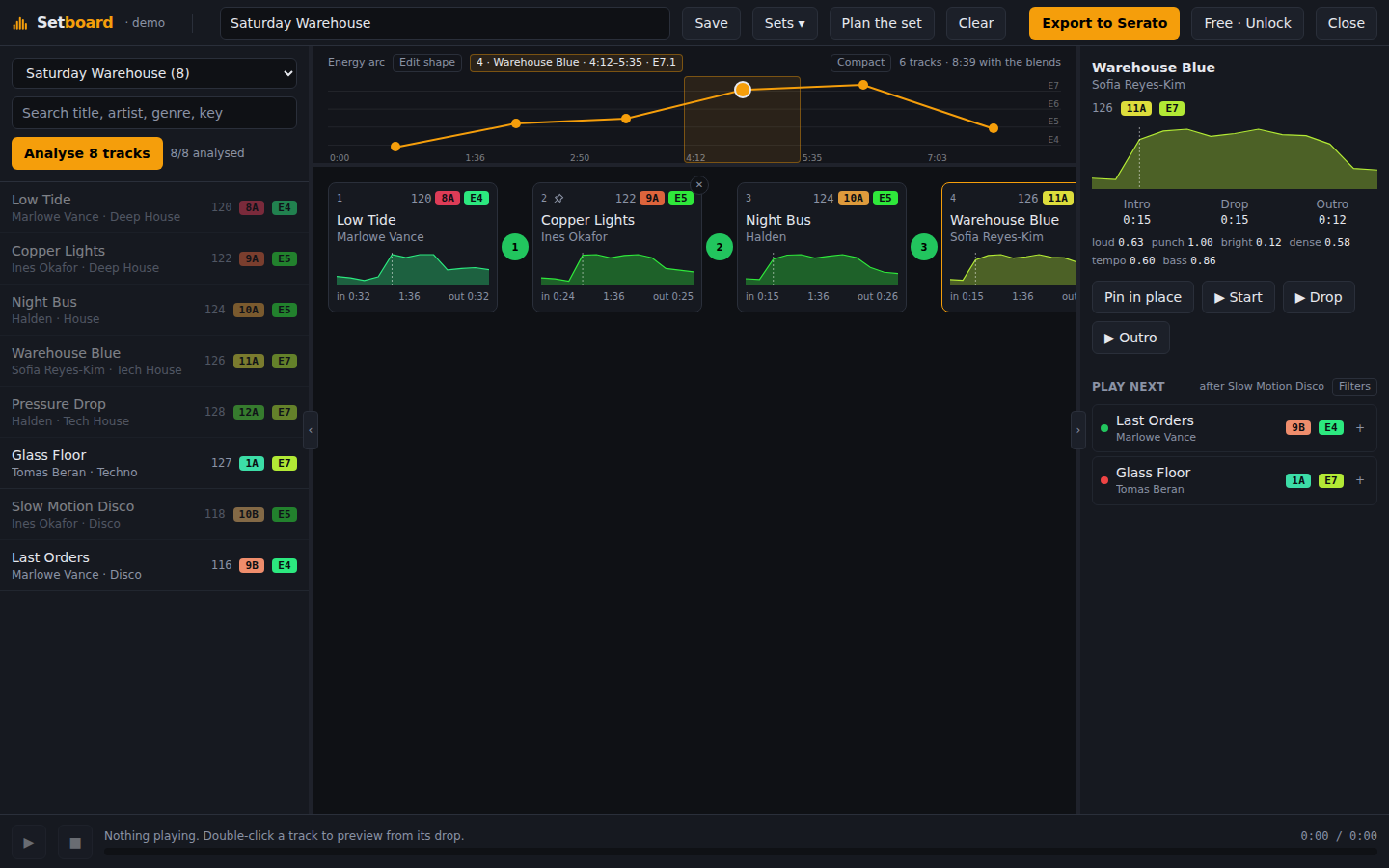
Drag tracks from the library onto the board, or hover a track and press +. Cards sit in play order. Drag a card to move it, press the × to remove it, or select it and press Delete. Every change to the board can be taken back with ↶ in the header or Ctrl+Z (⌘Z on a Mac), and made again with ↷ or Ctrl+Shift+Z.
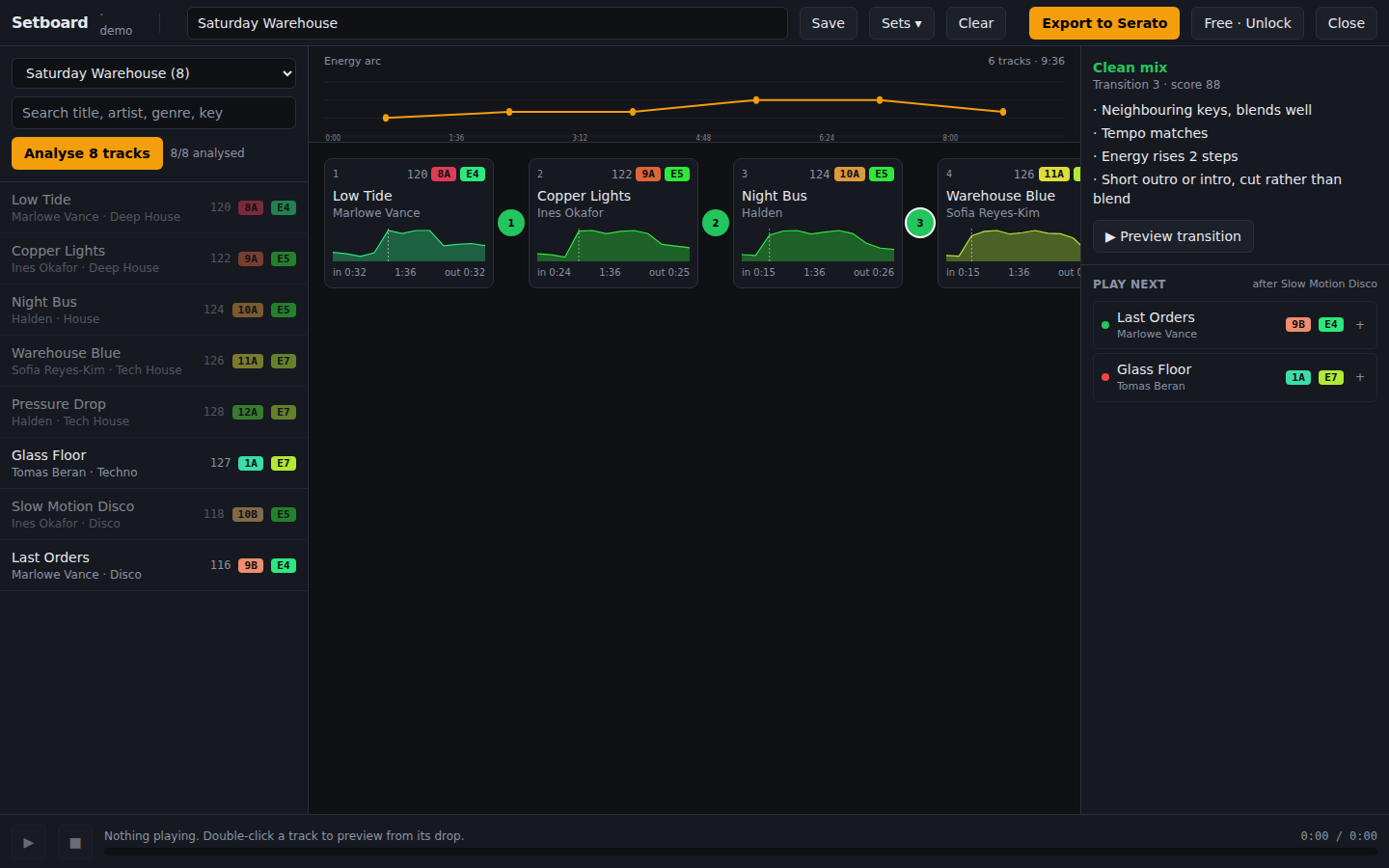
Each card shows the track's loudness over time. in is the intro length, out the outro length, and the dotted line marks the drop. The energy arc above the board plots one dot per track so you can see the shape of the night at a glance. A sag in the middle is the kind of thing it is there to show you.
Click a card and the Inspector on the right shows its intro, drop and outro, with Start, Drop and Outro buttons to listen from each point. Double-click any track to play from its drop. Under Play next the Inspector ranks the rest of the crate by how well each track follows the last one on the board.
Press Filters to steer that list. Set a BPM range (the ±6% button fills in tempos a pitch fader can reach from the last track), limit the key to the same one or its neighbours on the Camelot wheel, pick an energy direction (up, level or down), choose which crate to look in, or skip tracks you have already used in your other saved sets. Every filter is a rule, so a track that breaks one is not shown, and a track with no BPM, key or analysis yet is held back and counted so you know it is there.
4. Let Setboard order it
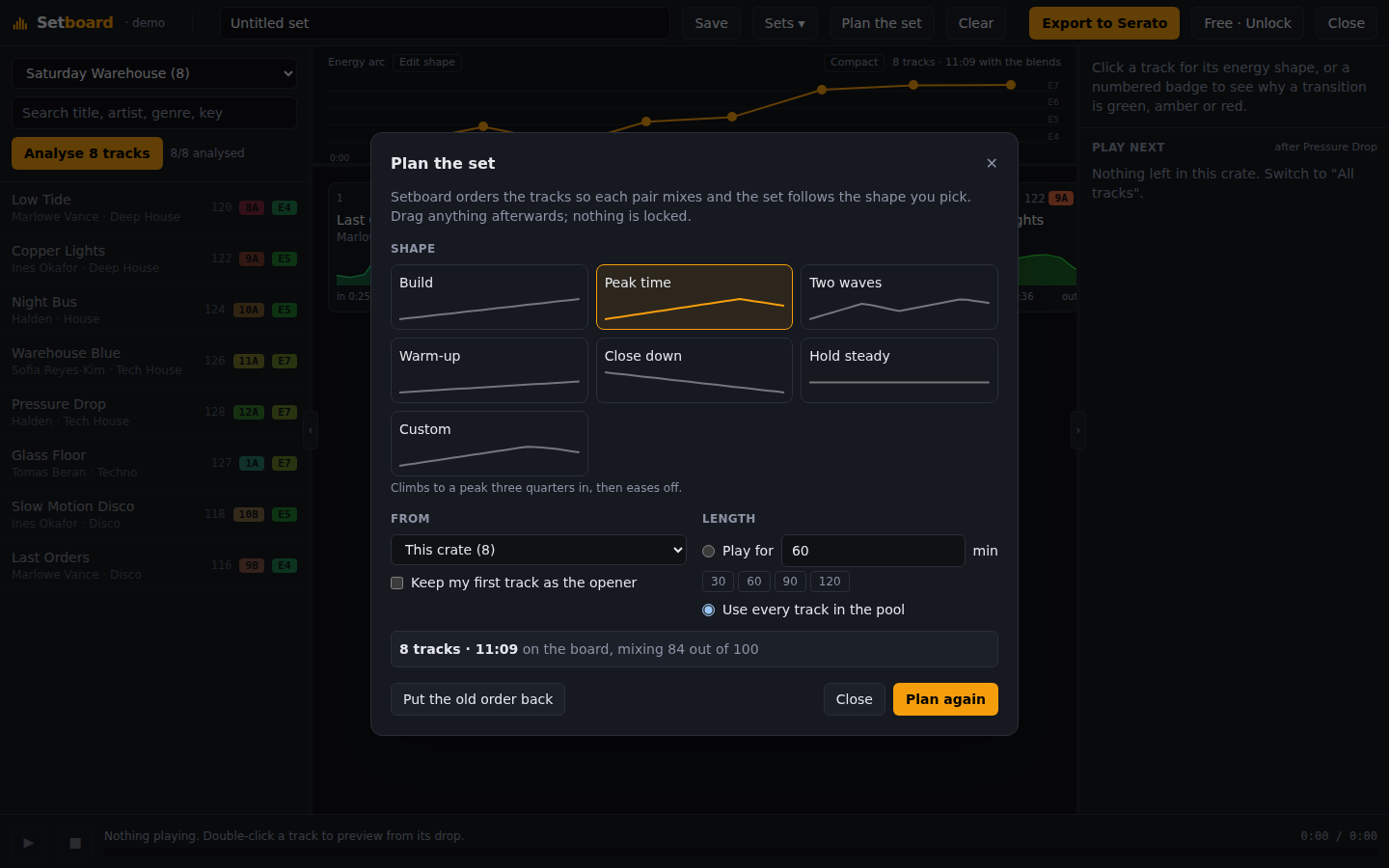
Press Plan the set and Setboard does the ordering. It takes a pool of tracks, the shape you want the night to have and how long you are playing, then searches for the order where every pair mixes and the energy follows that shape.
Pick a shape from the six sparklines:
- · Build climbs from the first track to the last.
- · Peak time climbs to a peak three quarters in, then eases off.
- · Two waves rises, pulls back in the middle, then goes higher.
- · Warm-up stays in the lower half, for the opening slot.
- · Close down starts high and comes down to the lights coming on.
- · Hold steady keeps one level the whole way.
Then choose what to order: this crate, your whole library, or only what is on the board, which reorders a set you have already picked without adding anything. Say how long you are playing and Setboard stops once the set runs that long, counting the time each blend saves, so a 90-minute slot really is 90 minutes. Tick Keep my first track as the opener when you already know how you are starting.
To lock more than the opener, pin a card: press the pin that appears on it when you hover, press P with the card selected, or use Pin in place in the Inspector. Pinned cards stay where they are when you plan again or reshape the arc, and Setboard orders everything else around them. Pin the last card and it stays the closer, however long the new set runs.
The result lands on the board as ordinary cards: drag them, delete them, add your own. Put the old order back undoes the whole thing in one click. Nothing is random, so the same crate and the same settings always give the same set, and the score next to the result is the mean of the transition grades, out of 100.
Analyse first. Without energy scores the planner has only key and tempo to go on, and the shape is guesswork; the dialog says so when too few tracks are analysed.
Tell Setboard where you mix
Setboard works out each track's intro, drop and outro by listening, and it can be wrong: a long breakdown looks like an outro, a fake ending looks like the end. If you have set hot cues or loops in Serato or Rekordbox, Setboard reads them and trusts you instead. It only reads; your cues and beatgrids are never changed.
Serato has no "mix in" or "mix out" marker, so Setboard goes by the name of the cue or loop. Case and punctuation do not matter, so Mix-Out and mix out are the same:
- · Out, Mix out, Outro, Outro start, Fade out: the outro starts here (at the start of the loop, for a loop).
- · In, Mix in, Intro end, Main, Groove, Beat in: the intro ends here (at the end of the loop, for a loop).
- · Drop, Drop 1, First drop: the first drop. With no In cue it also ends the intro, when that makes the intro shorter.
A loop you have not named still counts where it can hardly be anything else: one that starts in the last quarter of the track is taken as the outro loop, and one at the very start as the intro loop. Cues with any other name are ignored.
Where your marks apply they replace the analysis everywhere: the transition grade, the preview, and the running time the planner counts. Click a card and the Inspector writes your cue or your loop under any value they set; hover it to see what the audio analysis had found. Analyse the track first (the marks refine an analysis), and if you change a cue in Serato, reopen the library and Setboard picks it up.
5. Read the transition badges
The numbered circle between two cards grades that transition. Green should mix cleanly, amber is workable, red is likely to clash. Click a badge and the Inspector explains it:
- · Key: same key, a neighbour on the Camelot wheel, relative major or minor, an energy-boost move, or a clash.
- · Tempo: how far apart the BPMs are and whether that is a pitch-fader move or a jump.
- · Energy: how many steps up or down the score moves.
- · Room to blend: whether the first track's outro and the next track's intro are long enough to overlap.
6. Preview a mix
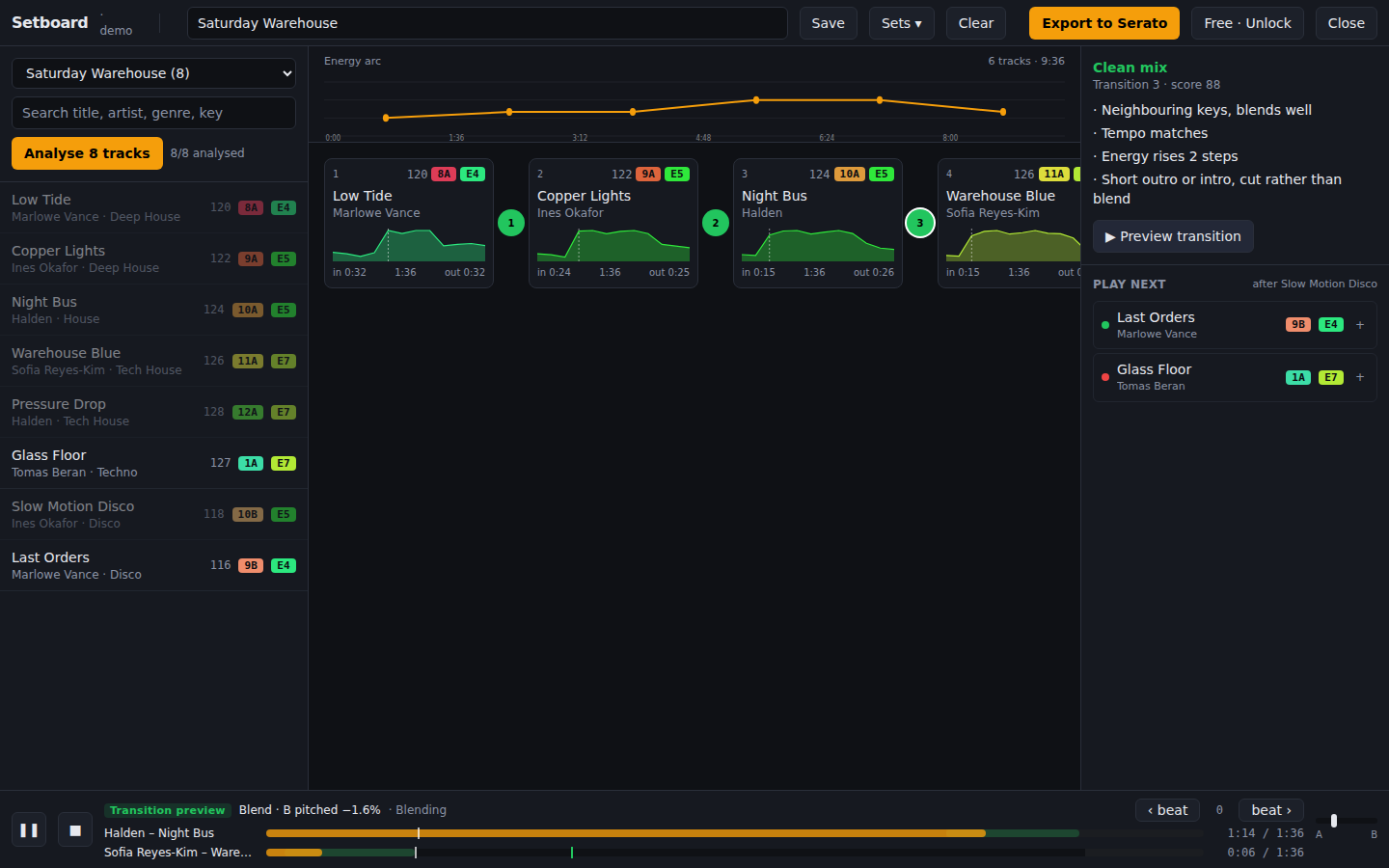
With a badge selected, press Preview transition. Setboard mixes the two tracks the way you would:
- · Blend: when the tempos are within 8 % (half and double time count), the first track's outro plays under the second track's intro with a crossfade, and the second track is pitched to match.
- · Cut: when the tempos are further apart, the first track stops where its outro begins and the second drops straight in from its first downbeat.
The player bar shows just the stretch being mixed: Out is the track you are leaving and In the one you are going to, on one timeline, with the stage you are hearing named underneath (the first track alone, Both playing, then the second alone). A line above says in plain words whether the incoming track was sped up or slowed down, and to what BPM. If the beats clash, ‹ Earlier and Later › move the incoming track by one beat. Space pauses and resumes, Replay plays it again once it has finished, and ✕ closes it.
7. Export to Serato
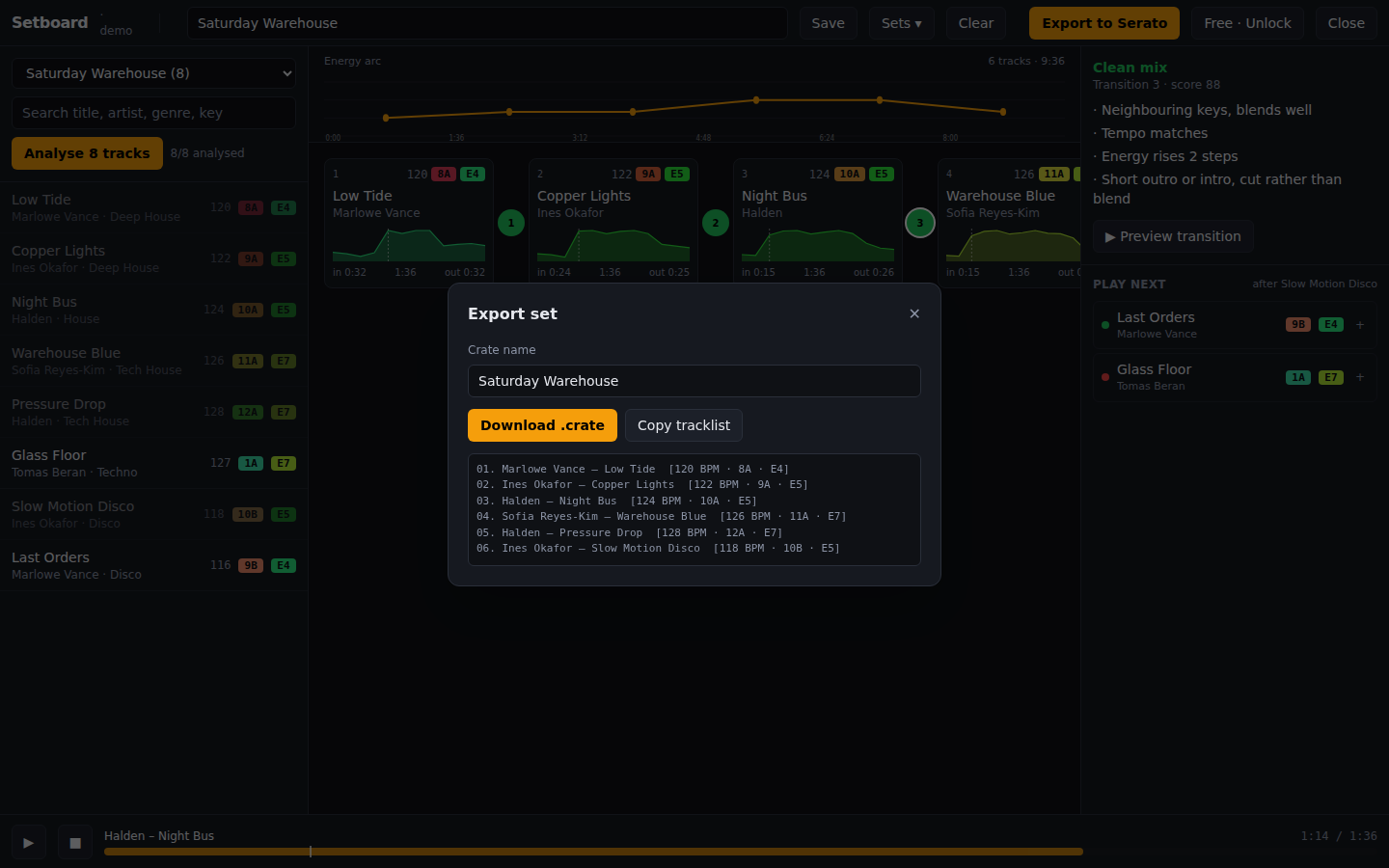
Name the set in the top bar and press Save to keep it in Setboard. Then press Export to Serato and Write crate into Serato. Chrome asks once for permission to write into _Serato_, and the dialog shows the exact file it saved, for example Music\_Serato_\Subcrates\Friday.crate.
Quit Serato completely and reopen it. Serato reads crates at launch, and the new one appears at the bottom of the crate list. Nothing else in your library changes: cue points, loops, beatgrids and the database are untouched.
In Firefox or Safari, or if you opened the folder the other way, Download .crate gives you the file to drop into _Serato_/Subcrates yourself. Copy tracklist puts a plain-text version on the clipboard.
With a Rekordbox library the button says Export to Rekordbox and gives you the set as a playlist file, two ways:
- · .m3u8, the quickest: in Rekordbox choose File → Import → Import Playlist and pick the file.
- · .xml: in Rekordbox open Preferences → Advanced → Database, set rekordbox xml to the file, then drag the playlist from rekordbox xml in the tree into your Playlists.
Either way the tracks are the ones already in your collection, so cues, beatgrids and play history stay as they are.
8. Free and licensed
The free version analyses up to 50 tracks and saves 3 sets. Export is always included. A licence is a one-time US$24 and unlocks unlimited analysis and sets on up to 3 computers.
After paying, your key arrives by email within a minute. In the app, click Free · Unlock (or Licence key on the start screen), paste the key and press Activate. The key is checked once a week when you are online and keeps working offline in between.
Reference
What the pills mean
- · 124 tempo in BPM, from Serato or detected.
- · 8A key in Camelot notation. Codes that match or sit one step apart (7A, 9A, 8B) mix cleanly.
- · E7 energy from 1 to 10. Roughly: 1–3 ambient or beatless, 4–6 groove, 7–8 peak-time, 9–10 relentless.
How energy is scored
Six measurements from the audio, weighted: hits per second in the loud sections (0.35), brightness above 3 kHz (0.2), loudness (0.15), a mild tempo prior (0.15), bass weight (0.1) and how much of the track runs at full intensity (0.05). Loudness on its own is a poor guide because every modern master sits near the same level. Click a track in the Inspector to see each input from 0 to 1.
Keyboard
- · Space play or pause
- · ← → select the previous or next card
- · Delete remove the selected card
- · Ctrl Z undo the last change to the board (⌘ Z on a Mac)
- · Ctrl Shift Z or Ctrl Y redo it
- · Esc close a dialog
Troubleshooting
Chrome says it can't open this folder because it contains system files
Chrome refuses the root of any drive (C:\, a USB drive), your user profile folder and Windows system folders. Pick the folder that actually contains _Serato_, usually Music. If your library is on an external drive, where Serato keeps _Serato_ at the root, use the Choose the folder the other way link on the start screen. It has no such limit; export then downloads the crate.
I exported a crate but it isn't in Serato
Serato reads crate files when it starts. Quit it completely and reopen it, then look at the bottom of the crate list. The export dialog shows the exact path that was written, so you can also check it in your file manager.
A track shows as unplayable or fails to analyse
Either the file is outside the folder you opened, or the browser cannot decode that format. Serato stores paths relative to the drive, so open a folder that contains all your music. Chrome decodes MP3, AAC, WAV, FLAC and OGG.
The energy score feels wrong for a track
Click the track and read the breakdown under its shape in the Inspector. Each input is shown from 0 to 1 with a tooltip explaining the raw measurement. A quiet, sparse track with a fast tempo can still score mid-range because of the tempo prior; a loud pad scores low because it has no hits.
Playback is silent
Browsers block sound until you have clicked something on the page. Click any button, then play again. Check the system volume and that the browser tab isn't muted.