DJ set planner for Serato and Rekordbox
See your set before you play it.
Setboard scores every track in your Serato crates or Rekordbox playlists for energy and grades each transition by key, tempo and energy. Pick the shape and length of your set and it orders the tracks, ready to preview and export back to your DJ software.

Your library, on disk.
Point it at the folder with _Serato_ or your Rekordbox XML. Crates, keys and BPMs load in seconds.
Energy from the audio.
Not a tag you type. Intro, drop and outro found for you. No AI, no cloud.
Back into Serato or Rekordbox.
Export writes a real crate or playlist. Cue points, loops and beatgrids untouched.
At a glance
- Works with
- Serato DJ Pro and Serato DJ Lite (the _Serato_ folder), and Rekordbox (its XML export)
- Runs in
- Chrome or Edge for one-click export; Firefox and Safari download the crate
- Audio formats
- MP3, AAC, WAV, FLAC and OGG, decoded by the browser
- Analysis
- Energy 1–10, intro, drop and outro from the audio; Camelot key and BPM from your library or detected
- Planning
- Orders a crate into six energy arcs for a slot length you set, or reorders the set you already picked
- Privacy
- Everything runs on your computer; no account, no upload, works offline once open
- Price
- Free for 50 tracks and 3 sets; US$24 once for unlimited use on up to 3 computers
How it works
The whole thing in 74 seconds, sound on: a crate becomes a planned set, you hear one of its blends, and it goes back into Serato.
-
1
Open a crate, press Analyse
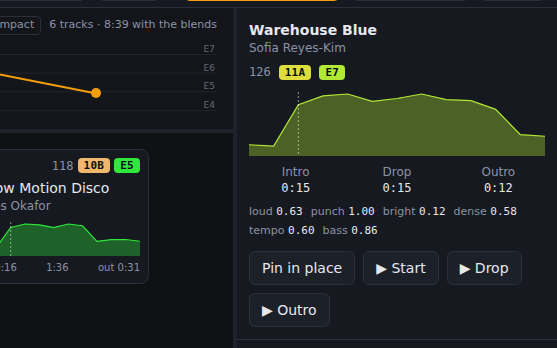
Each track is decoded on your computer and measured: an energy score from 1 to 10, its intro and outro length, and where the first drop lands. Key and BPM come from Serato or Rekordbox, or are detected when missing. Results are cached, so a crate only takes time once.
-
2
Let it order the set
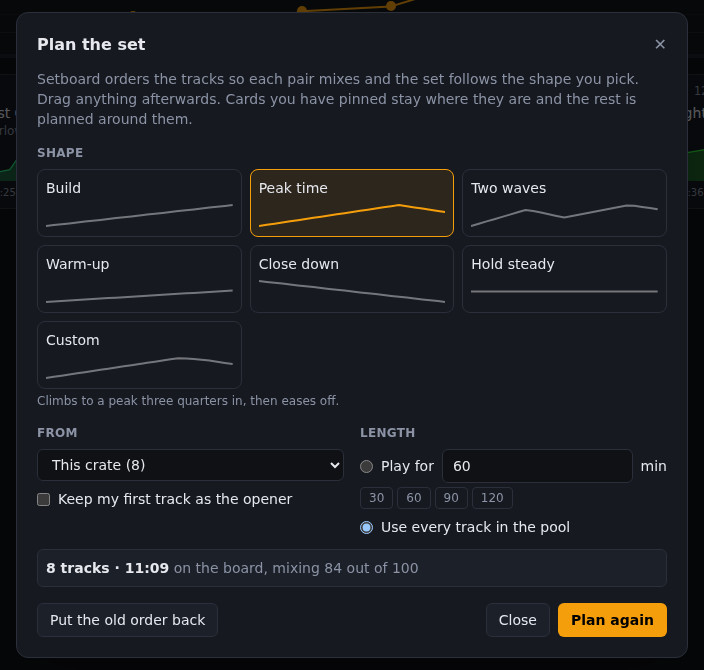
Press Plan the set, pick the shape you want the night to have and how long you are playing. Setboard searches for the order where every pair mixes and the energy follows that curve, then puts it on the board. One click puts your old order back, and everything stays draggable. Prefer to do it yourself? Drag tracks into play order and the energy arc redraws as you go.
-
3
See every transition graded
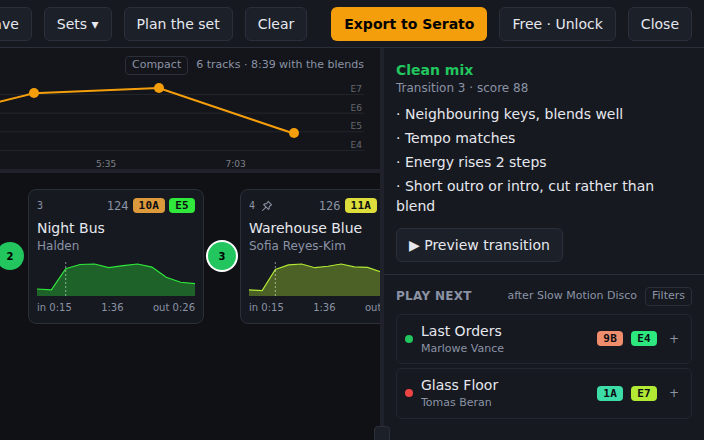
Every transition gets a green, amber or red badge, and clicking it explains why: key relation, tempo gap, energy step, and whether there is room to blend.
-
4
Hear it, then export
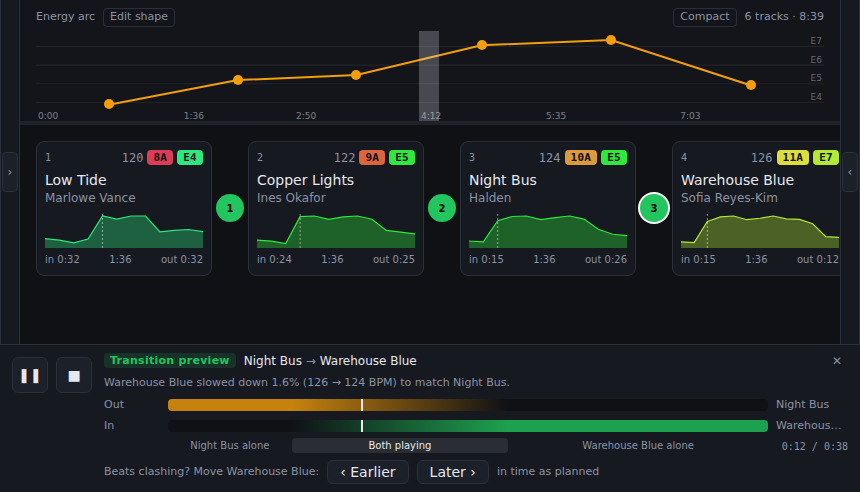
Preview any transition as a real mix: outro under intro, crossfaded, with the next track pitched to tempo. Happy? Export writes the set into Serato as a crate (restart Serato and it is there), or gives you a Rekordbox playlist to import.
What you get
Energy you can trust
Scored from hits per second, brightness, loudness, tempo, bass and density, so a quiet master and a loud one of the same groove score the same. Intro, drop and outro are found for every track, and the Inspector shows every input.
Harmonic mixing on the Camelot wheel
Same key, neighbours, relative major and minor, energy-boost moves. Every transition is checked on the wheel and the badge tells you what kind of harmonic move it is.
Play-next suggestions
After the last track on the board, Setboard ranks the rest of your crate by how well it follows. Drag a suggestion straight in.
Private by design
Runs entirely in the browser. Your files never leave your computer. Works offline once the page is open.
Pricing
One payment. No subscription. Use it on up to 3 computers.
Licence
US$24 once
- · Unlimited analysis
- · Unlimited saved sets
- · Up to 3 computers
- · 14-day refund if it doesn't work for your library
Your key arrives by email. Paste it into Setboard under “Free · Unlock”.
Questions
Which DJ software does Setboard work with?
Serato DJ Pro, Serato DJ Lite and Rekordbox. For Serato, Setboard reads the _Serato_ folder in your Music folder or on an external drive, and writes crates back into it. For Rekordbox, export your collection with File → Export Collection in xml format, and Setboard reads that file and gives you the set back as a playlist to import. Traktor is not supported yet.
Does Setboard upload my music?
No. Everything runs in your browser. Tracks are decoded and analysed on your computer, results are cached locally, and nothing is sent to a server. The only network calls are to check a licence key.
Does Setboard order the set for me?
Yes. Press Plan the set, choose an energy arc and how long you are playing, and Setboard searches your crate for the order where every pair mixes and the energy follows that shape, stopping once the set fills your slot. It is a search over the same transition scores the badges show, not a generative model, so the same crate and settings always give the same order. Everything it produces is draggable, and one button puts your own order back.
Can it just reorder a set I have already picked?
Yes. In the Plan dialog choose Only what is on the board and Setboard reorders exactly those tracks without adding or dropping any. Tick Keep my first track as the opener to fix how the set starts.
How is energy calculated?
Setboard listens to the audio and blends six measurements: hits per second in the loud sections, brightness above 3 kHz, loudness, a mild tempo prior, bass weight, and how much of the track runs at full intensity. It is signal processing, not AI, and the Inspector shows every input so you can see why a track scored what it did.
Will it change my cue points or beatgrids?
No. For Serato, export only writes a new .crate file into _Serato_/Subcrates. For Rekordbox, export is a playlist file you import. Your library, cue points, loops and beatgrids are never touched.
Which browser should I use?
Chrome or Edge, for one-click export straight into Serato. Firefox and Safari can open your library and analyse tracks, and download the crate or playlist file for you to import yourself.
My library is on an external drive. Does that work?
Yes. Chrome refuses to grant a website the root of a drive, so use the “Choose the folder the other way” link on the app's start screen, which has no such limit. Export then downloads the crate.
How much does it cost?
The free version analyses up to 50 tracks and saves 3 sets, and export is always included. A licence is a one-time payment of US$24 and unlocks unlimited analysis and sets on up to 3 computers. There is no subscription.
Can I get a refund?
Yes. If Setboard does not work for your library, reply to your licence email within 14 days and you will be refunded in full.
Plan tonight's set.
Free for your first 50 tracks. No account, no upload.
Open Setboard – it's free